

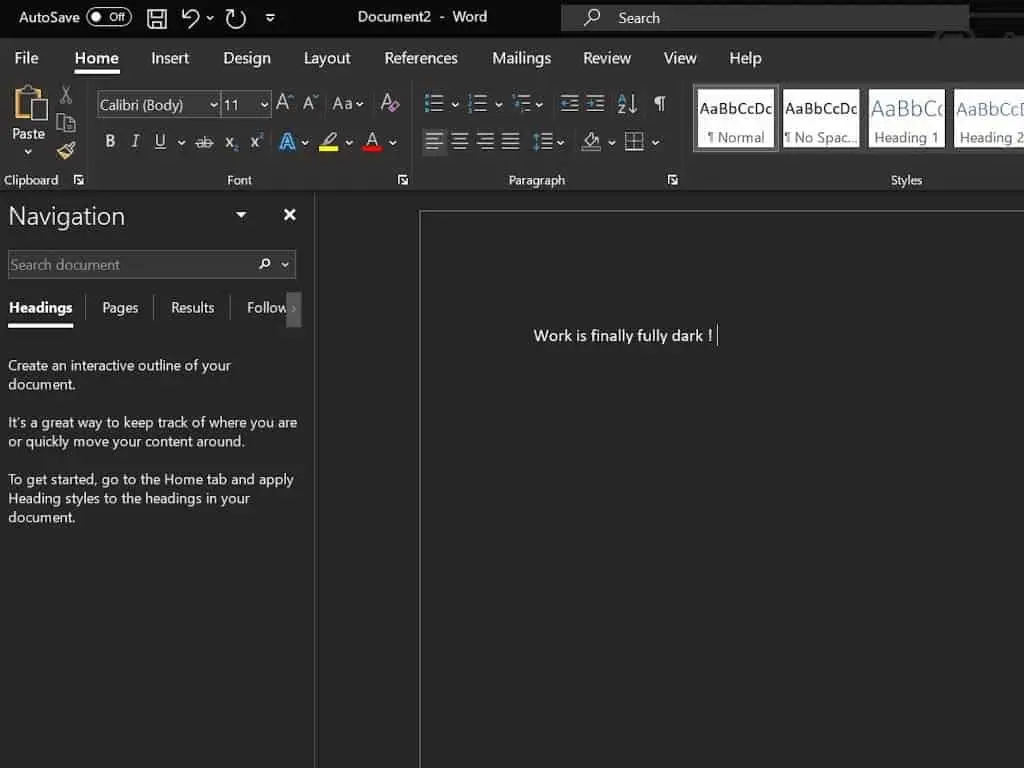

According to the leak, Microsoft is currently working hard to provide comprehensive dark theme support for the MS Word desktop. This means that once the feature is open to the public, you will be able to apply the dark theme throughout the application. The option to turn on the dark theme already exists in Office, but turning it on will apply the dark theme to certain parts of the Office application. For example, turning on this option will apply the dark theme to the ribbon and other areas in Word. However, when the new feature becomes active, it will be different. Users will be able to adopt the dark theme in the document area, status bar, and almost everywhere.
Microsoft Office Word desktop dark mode in development
As of now, it appears that this feature is still in the development stage. This means that we may have to wait for some time before Microsoft provides the feature to the public. Nevertheless, @flobo09 claims that Microsoft Office insiders will get the 100% Word desktop dark mode support before others.
According to speculations, the new Microsoft Office Word desktop is available in the beta channel. However, only Word is getting this treatment while Excel and PowerPoint are still waiting to receive a similar treatment. Furthermore, there are reports that by next month, the dark theme improvements for Word for Windows will hit the production channel(s).
Although this will make many fans happy, all we have are speculations for now. The company has not officially confirmed anything regarding this feature. What do you think about the Microsoft Office Word desktop dark mode? Will you be happy to see this feature with just Word or the entire Office lineup? Let us know your thoughts in the comment section below.





Place comments
0 Comments
You are currently seeing only the comments you are notified about, if you want to see all comments from this post, click the button below.
Show all comments